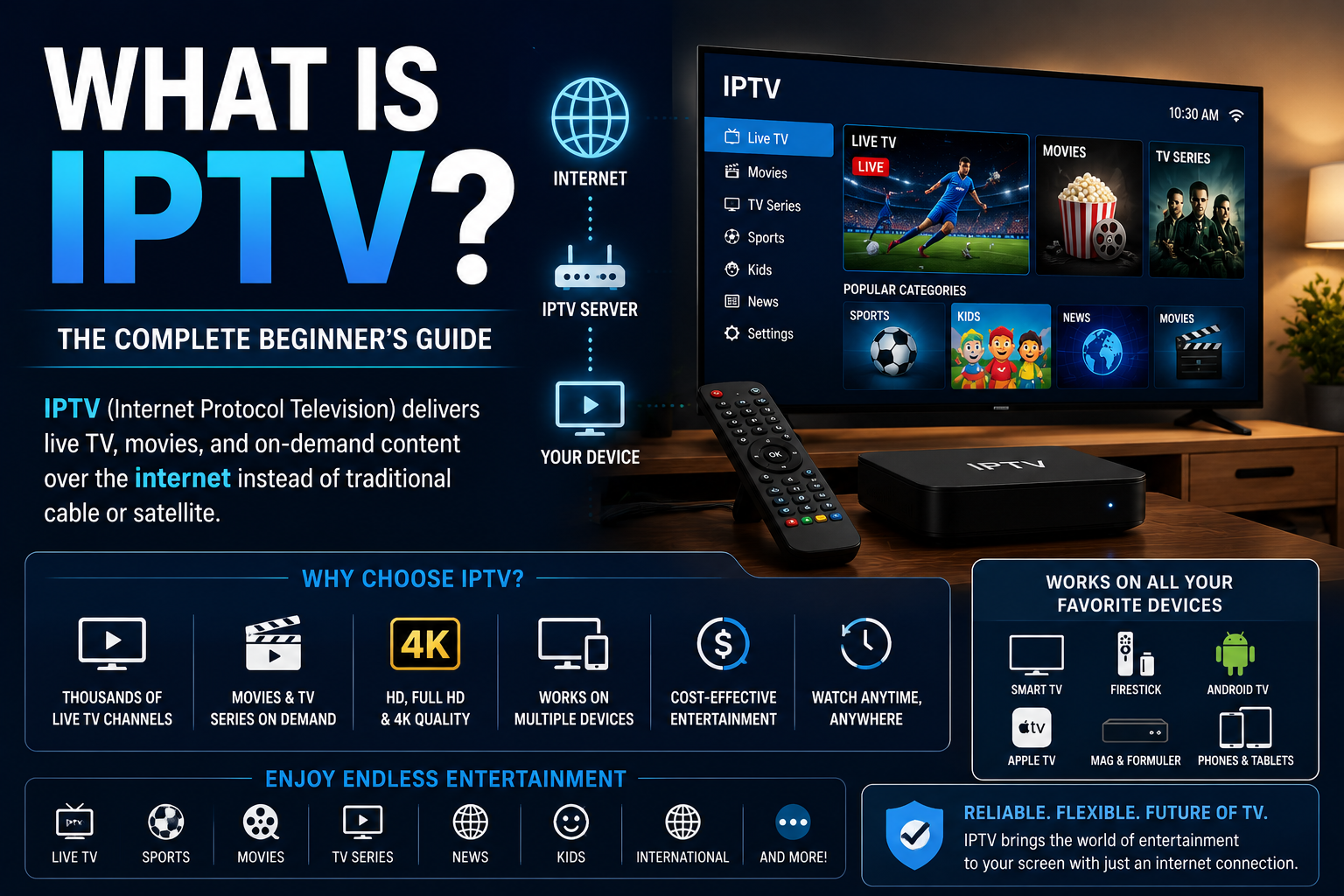
What is IPTV? IPTV stands for Internet Protocol Television, a technology that delivers television channels and video content through internet protocol networks instead of traditional cable or satellite broadcasting.
For Canadian viewers, IPTV can provide access to live television, movies, television series and other programming through compatible streaming devices. Depending on the service, you may be able to watch using a Smart TV, Amazon Firestick, Android TV box, computer or smartphone.
But how does IPTV actually work? Is IPTV legal in Canada? Do you need a special box? And what is the difference between M3U, Xtream Codes and Stalker IPTV?
This updated 2027 beginner's guide answers those questions and explains how to choose a compatible IPTV setup.
What Is IPTV? IPTV Meaning Explained
IPTV means Internet Protocol Television. It is a method of delivering television and video using internet protocol technology.
Unlike traditional satellite television, which receives signals through a satellite dish, IPTV uses a network connection to deliver content to compatible applications and devices.
Depending on the service, IPTV may include three main types of content:
- Live IPTV: Television channels delivered in real time.
- Video on Demand (VOD): Movies and television programs available for selection.
- Catch-Up TV: Previously aired programming available for replay when supported.
Not every IPTV provider includes all three features. Content availability depends on the service and subscription.
How Does IPTV Work?
IPTV works by delivering television content from a provider's network to a compatible application or streaming device.
When you select a channel, your IPTV player communicates with the service and receives the appropriate video stream. Your device then decodes and displays the video.
A typical IPTV setup involves five steps:
- Internet connection: Your device connects to the internet.
- Compatible device: You use a Smart TV, streaming box, Firestick or another supported device.
- IPTV application: You install or open an application compatible with your subscription.
- Service connection: You enter the authorized playlist, login details or portal information supplied by your provider.
- Playback: The application loads available channels and streams the selected programming.
The exact process depends on the IPTV provider, application and connection method.
IPTV vs Cable TV vs Streaming Services
IPTV, traditional cable television and on-demand streaming platforms can all deliver entertainment, but their delivery methods and viewing experiences differ.
| Feature | IPTV | Traditional Cable | On-Demand Streaming |
|---|---|---|---|
| Delivery | Internet protocol networks | Cable television infrastructure | Internet |
| Live Channels | Commonly supported | Commonly supported | Depends on platform |
| On-Demand Content | Depends on service | Depends on package | Usually central to service |
| Equipment | Compatible application or device | TV receiver or supported equipment | Streaming application or device |
| Program Guide | Often available | Often available | Varies |
The distinction is not absolute. Some cable and telecommunications companies also use IPTV technology, and some streaming platforms include live television.
What Equipment Do You Need for IPTV?
You generally need an internet connection, a compatible device, suitable software and access to an authorized IPTV service.
Depending on your subscription, IPTV may work with:
- Amazon Firestick and Fire TV
- Android TV and Google TV
- Samsung and LG Smart TVs
- Formuler IPTV boxes
- BuzzTV streaming boxes
- Compatible MAG receivers
- Apple TV
- Windows and Mac computers
- Android phones, iPhones and tablets
Application availability varies by platform, operating system and region. Always confirm compatibility before purchasing.
How to Set Up IPTV on a Firestick
Amazon Fire TV devices are one option for IPTV playback because they connect to televisions through HDMI and support compatible streaming applications.
A typical setup process is:
- Connect your Fire TV device to your television and internet connection.
- Find a compatible IPTV player available for your device.
- Install the application from a trusted source.
- Open the application and select the appropriate connection method.
- Enter the subscription information supplied by your provider.
- Allow the application to load the available content.
- Test playback and adjust application settings if necessary.
Some applications support Xtream Codes credentials, while others accept M3U playlists. Portal-based subscriptions may require different software.
An IPTV application does not necessarily include television channels. It may require a separate subscription.
How to Watch IPTV on a Smart TV
Some Samsung, LG, Android TV and Google TV models support compatible IPTV applications without an external streaming box.
To get started:
- Check your television's operating system and app store.
- Confirm that an appropriate IPTV player is supported.
- Install the application.
- Enter the connection information provided by your service.
- Load the available channels and test playback.
If your television doesn't support the required application, an external streaming device may be an alternative.
What Is the Difference Between M3U, Xtream Codes and Stalker IPTV?
These terms describe different ways IPTV applications and devices connect to a service.
M3U IPTV
M3U is a playlist format that compatible media players use to organize and access streaming sources.
An IPTV provider may supply an M3U playlist URL for use with a supported application.
For more information, read our M3U IPTV guide.
Xtream Codes IPTV
Xtream Codes-compatible connections commonly use a server address, username and password.
Many IPTV applications include dedicated fields for entering this information.
Stalker Portal IPTV
Stalker Portal connections are commonly associated with portal-based IPTV receivers and MAC-address authentication.
Compatible devices use the portal information supplied by the service to access the available interface and programming.
| Connection Type | Common Setup | Typical Compatibility |
|---|---|---|
| M3U | Playlist URL | Compatible playlist players |
| Xtream Codes | Server URL, username and password | Supported IPTV applications |
| Stalker Portal | Portal URL and MAC-based authentication | Compatible receivers and portal applications |
The connection format alone does not determine picture quality, reliability or programming availability.
Do You Need an IPTV Box?
No. A dedicated IPTV box is not required for every IPTV service.
Many subscriptions can work through compatible Smart TVs, streaming sticks, computers or mobile applications.
However, dedicated IPTV receivers may provide additional connectivity, television-oriented remote controls and specialized playback interfaces.
Our IPTV Box vs Android Box comparison explains the differences between these device categories.
What Internet Speed Do You Need for IPTV?
The required internet speed depends on the video resolution, bitrate, compression format and number of simultaneous streams.
The following are general planning estimates rather than guaranteed minimum speeds.
| Streaming Quality | Approximate Bandwidth Per Stream |
|---|---|
| Standard Definition | 3–5 Mbps |
| HD | 5–10 Mbps |
| Full HD | 10–15 Mbps |
| 4K | 20–35 Mbps |
Actual requirements vary. If multiple people stream simultaneously, the household needs enough bandwidth for the combined activity.
A stable internet connection is often more important than a high advertised download speed.
Wi-Fi vs Ethernet: Which Is Better for IPTV?
Both Wi-Fi and Ethernet can support IPTV streaming.
Wi-Fi offers convenience, particularly for streaming sticks and devices located away from the router.
Ethernet can provide a more consistent connection for stationary televisions and IPTV receivers, especially in homes affected by Wi-Fi interference.
If you experience frequent buffering, testing a wired connection can help determine whether your home network is contributing to the problem.
Why Does IPTV Buffer or Freeze?
IPTV buffering occurs when a device cannot receive or process video data quickly enough for continuous playback.
Common causes include:
- Weak Wi-Fi signal
- Internet congestion
- Device performance limitations
- Outdated IPTV applications
- Problems with the source stream
- Temporary service interruptions
- Insufficient bandwidth for multiple streams
To troubleshoot, restart your device, test your internet connection, update your application and check whether the issue affects one channel or multiple streams.
No IPTV provider can guarantee completely interruption-free streaming under every network condition.
How Much Does IPTV Cost in Canada?
IPTV subscription costs in Canada vary depending on the provider, available programming, subscription duration, features and number of simultaneous connections.
Common subscription durations include one month, three months, six months and twelve months.
Longer subscriptions may offer a lower average monthly price, but they also involve a greater upfront commitment.
Additional costs may include paid IPTV applications, streaming equipment and extra simultaneous connections.
For a more detailed explanation, see our guide to IPTV subscription costs in Canada.
Can You Use IPTV on Multiple TVs?
That depends on the number of simultaneous connections included with your subscription.
For example, a one-connection plan generally permits one active stream at a time. A two-connection plan may allow two devices to watch different programming simultaneously.
Installing the same IPTV application on several devices does not necessarily mean your subscription permits simultaneous playback on all of them.
Always review the connection limits and provider's account-sharing terms.
Is IPTV Legal in Canada?
Yes. IPTV is a legal television delivery technology in Canada.
However, the legality of a particular IPTV service depends on whether it has the appropriate rights to distribute copyrighted channels, movies, sports and other programming.
Customers should verify content authorization, review the service terms and avoid assuming that a subscription is licensed simply because it is advertised online.
How to Choose an IPTV Provider in Canada
Choosing an IPTV service involves more than comparing advertised channel counts.
Before subscribing, consider:
- Whether the provider has appropriate content distribution rights.
- Which devices and applications are supported.
- Whether the service uses M3U, Xtream Codes or portal-based connections.
- Which programming categories are available.
- How many simultaneous streams are permitted.
- Whether the service offers clear pricing and renewal terms.
- What customer support is available.
- Whether additional equipment or app fees apply.
If you're researching a Canadian IPTV Provider, SharkTV.ca offers information about IPTV products, streaming devices and subscription options for Canadian customers.
Frequently Asked Questions About IPTV
1. What does IPTV stand for?
IPTV stands for Internet Protocol Television, a method of delivering television and video over internet protocol networks.
2. How does IPTV work?
IPTV uses network connections to deliver video streams to compatible applications or devices, which decode and display the content.
3. Is IPTV the same as Netflix?
Not exactly. IPTV often emphasizes live television channels, while Netflix primarily offers on-demand programming. Both use internet-based video delivery technologies.
4. Can IPTV work on Amazon Firestick?
Yes, many IPTV services support compatible Fire TV applications. The correct application depends on the subscription format.
5. Can I watch IPTV on a Samsung or LG Smart TV?
Some Samsung and LG models support IPTV players. Availability depends on the television's operating system, model and app store.
6. Do I need an IPTV box?
Not necessarily. Compatible Smart TVs, streaming sticks, computers and mobile devices may support IPTV without a dedicated receiver.
7. What is an M3U playlist?
An M3U playlist is a format used to organize media entries and streaming sources for compatible applications.
8. What are Xtream Codes?
Xtream Codes-compatible connections commonly use a server address, username and password to connect supported IPTV applications to a service.
9. What is Stalker IPTV?
Stalker IPTV commonly refers to portal-based IPTV connections that may use MAC-address authentication with compatible receivers or applications.
10. Can I use IPTV on two televisions?
Yes, if your subscription permits two simultaneous connections and your devices are compatible.
11. How much internet speed does IPTV need?
Bandwidth needs vary by resolution and bitrate. Stable internet connectivity and sufficient bandwidth for simultaneous viewers are important.
12. Why does IPTV freeze?
Freezing can result from Wi-Fi problems, network congestion, application issues, device limitations or unavailable source streams.
13. Is IPTV legal in Canada?
IPTV technology is legal. Services distributing copyrighted programming must have the necessary authorization and rights.
14. Is IPTV cheaper than cable?
It can be, depending on the subscription, programming, equipment costs and any required internet or application fees.
15. Does an IPTV player include channels?
Not necessarily. Many IPTV players are software applications that require a separate compatible subscription or authorized content source.
Final Thoughts: Understanding IPTV in 2027
IPTV is a technology that delivers television and video through internet protocol networks. It can support live television, on-demand programming and additional features depending on the service.
For Canadian viewers, understanding IPTV starts with choosing a compatible device, identifying the required connection method and confirming that the service offers the programming and features they need.
Before subscribing, compare device compatibility, pricing, connection limits, customer support and content authorization.
With the right information, beginners can better understand IPTV technology and make informed decisions about their streaming setup.
Related Products