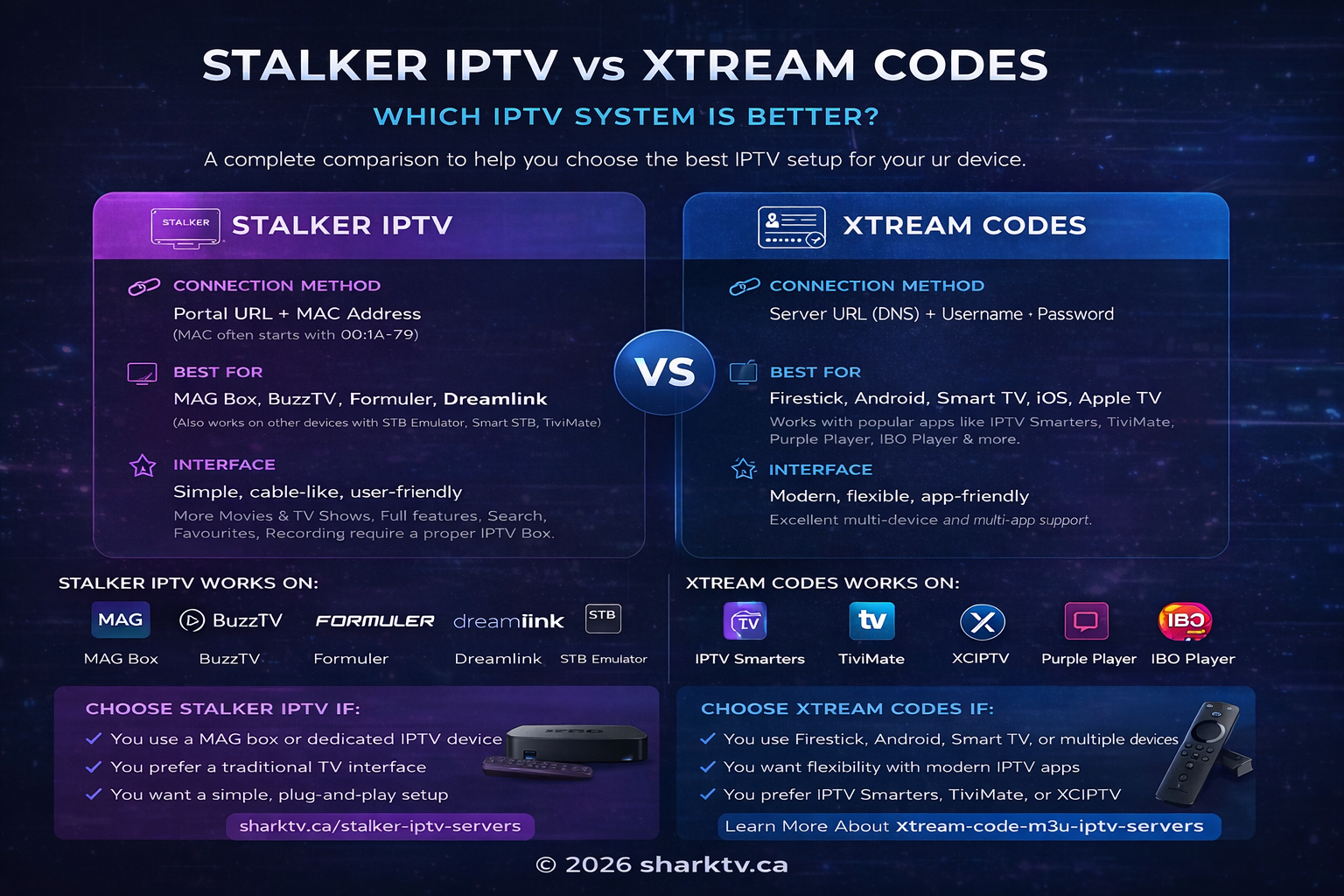
Stalker IPTV vs Xtream Codes IPTV: the main difference is how your device connects to the service. Stalker commonly uses a portal URL and a registered MAC address, while Xtream Codes uses a server URL, username and password. Stalker is often a convenient choice for dedicated IPTV boxes; Xtream Codes is usually more flexible for app-based streaming and eligible multi-connection subscriptions.
Neither format automatically offers better picture quality, faster channel switching or less buffering. The streaming source, device, application, network and subscription all influence performance. If you are comparing Canadian IPTV subscriptions, this 2027 guide explains how to choose the right connection for your home.
Stalker Portal vs Xtream Codes: Quick Comparison
| Feature | Stalker IPTV | Xtream Codes IPTV |
|---|---|---|
| Login | Portal URL and registered MAC address | Server URL, username and password |
| Typical devices | MAG, Formuler, BuzzTV and compatible portal apps | Firestick, Android TV, Google TV and compatible Smart TV apps |
| Channel switching | Depends on portal, player and stream | Depends on API, player and stream |
| HD and 4K | Where supported by source and device | Where supported by source and device |
| Multiple TVs | Often one registered device per line | Depends on purchased simultaneous connections |
| TV guide (EPG) | Portal supplies guide when available | API or separate EPG source, depending on player |
| Catch-up / recording | Depends on service, device and permissions | Depends on service, app and permissions |
| Moving to another device | May require provider to update registration | Often easier; account restrictions still apply |
| Pricing | Depends on package | Depends on package |
What Is Stalker IPTV and How Does a MAC Portal Work?
Stalker Portal is associated with middleware originally developed by Infomir for managing television services and set-top boxes. A compatible receiver or player communicates with a portal to load its authorized channel list, categories and available programme information. Many consumer Stalker services identify the account using a registered MAC address; other device identifiers or authentication requirements may also apply.
A MAC address is a 48-bit identifier commonly displayed as six pairs of hexadecimal characters, such as 00:1A:79:XX:XX:XX (illustrative format). The address shown in an IPTV app may be virtual and different from the physical network adapter address. Always supply the identifier requested by your provider, not an address copied from another device.
Explore Stalker Portal IPTV packages if your receiver requires MAC-based activation.
What Is Xtream Codes IPTV (XC API)?
Xtream Codes-compatible IPTV is a widely used API login format, also searched for as Xtream Code IPTV or Xtreme Codes IPTV. A compatible player uses the supplied server address, username and password to retrieve available content and account information. The application organizes channels, movies, series and guide information where the service supports them.
- Server URL, including a port if supplied.
- Account username.
- Account password.
The login format does not guarantee encrypted communication. HTTPS is preferable where supported. Keep your credentials private and use trusted players. Compare Xtream Codes and M3U IPTV plans for compatible app-based setups.
Stalker vs Xtream Codes vs M3U: What Is the Difference?
M3U is a playlist file format, rather than a portal middleware or account API. A provider may supply an M3U URL containing stream entries, sometimes with account credentials embedded in the address. An Xtream-compatible service may also offer an M3U playlist for the same account, but this depends on the provider.
| Connection | What you enter | Best use |
|---|---|---|
| Stalker | Portal and registered device identifier | Compatible portal receivers or apps |
| Xtream Codes | Server, username, password | Apps with XC login and structured categories |
| M3U | Playlist URL or file | Players supporting standard playlists |
An M3U playlist does not necessarily include a programme guide; some players need a separate XMLTV EPG source. Changing from M3U to Xtream Codes on the same service may improve organization without changing the underlying video stream.
Which Devices Support Stalker Portal and Xtream Codes?
| Device | Stalker Portal | Xtream Codes |
|---|---|---|
| Infomir MAG | Common on compatible portal models | Model and software dependent |
| Formuler / MYTVOnline | Supported on compatible models | Supported on compatible models |
| BuzzTV / Dreamlink | Model and firmware dependent | Model and firmware dependent |
| Firestick / Fire TV | Compatible player on supported models | Compatible player on supported models |
| Android TV / Google TV / NVIDIA Shield | Compatible app required | Compatible app required |
| Samsung / LG Smart TV | Compatible portal app required | Compatible XC app required |
| Apple TV / iPhone / iPad | Compatible app required | Compatible app required |
| Windows / Mac | Compatible client required | Compatible client required |
Check the exact device model, app version and operating system before buying. A device capable of playing IPTV is not necessarily compatible with every login method.
Which IPTV Format Is Better for Firestick, Formuler or MAG?
Firestick and Android TV
Xtream Codes is often the simpler starting point for customers using app-based players. Stalker is also an option when the selected player supports portal connections. TiviMate supports Stalker, Xtream Codes and M3U on compatible Android TV devices; check installation availability for your Fire TV model. STBEmu is another option for compatible portal setups.
Formuler, MAG and BuzzTV
A supported Stalker portal can provide a familiar remote-controlled television experience. Some Formuler and BuzzTV models also support XC accounts. If your existing receiver only accepts a portal address, choose a compatible portal subscription rather than assuming a username/password login will work.
Samsung, LG and Apple TV
Choose the app first, then the subscription format. Native app selection differs between Samsung Tizen, LG webOS and Apple tvOS. TiviMate is designed for Android TV, not native Samsung, LG or Apple TV systems. An external streaming device can expand your player choices.
How to Set Up Stalker IPTV and Xtream Codes
Stalker Portal setup
- Open portal or server settings in your compatible receiver or app.
- Locate the MAC address or device identifier used by that portal profile.
- Provide the requested identifier to your service provider for activation.
- Enter the exact portal URL supplied by the provider.
- Save the configuration and reload the portal.
- Test live channels and guide information.
Xtream Codes setup
- Install a compatible IPTV player from a trusted source.
- Select its Xtream Codes or XC API login option.
- Enter the supplied server URL, username and password exactly.
- Save the account and allow categories and channels to load.
- Test playback and check account connection limits.
Menu labels vary by software. For a player supporting all three formats, follow our TiviMate IPTV setup guide.
Is Stalker IPTV Faster Than Xtream Codes?
There is no universal winner for channel zapping speed. A dedicated set-top box may switch channels quickly because its hardware and player are optimized for television use. A well-configured XC player may be equally responsive. Startup time also depends on the stream format, keyframe interval, server response and player buffering settings.
To compare fairly, use the same device where possible, the same internet connection, similar channels and multiple tests at different times. Measure the time from selecting a channel to stable playback, and separately measure interruptions during viewing. Do not assume a faster menu or channel change means a more stable video stream.
Stalker vs Xtream Codes Buffering and 4K Picture Quality
Both formats can deliver HD, Full HD and 4K when the original stream, application, hardware and display support them. Neither connection method guarantees 4K, 60 fps or buffer-free playback. Two packages may use different sources, bitrates and infrastructure, so comparing them may reveal service differences rather than protocol differences.
- If all channels freeze, check the internet connection and device first.
- If only one channel freezes, the source may be responsible.
- If playback fails only when a second TV is active, check the connection limit.
- If 4K stutters but HD works, check bandwidth, codec support and device decoding.
- If Wi-Fi is unstable, test with Ethernet where possible.
EPG, Catch-Up TV, Movies and Recording
Stalker can supply an integrated programme guide and catch-up information through the portal. Xtream-compatible players can retrieve guide data and organize VOD categories through the API. Both depend on the service supplying the necessary data. Recording and timeshift depend on app or receiver capabilities, storage, connection limits and permissions.
Neither format inherently contains more movies, live channels or sports. Check the actual package and authorized programming rather than using the connection type as a measure of library size.
Can You Use Stalker or Xtream Codes on Multiple TVs?
A Stalker subscription is commonly associated with one registered device identifier. A replacement receiver may require a MAC address update by the provider. Do not clone an active device identifier to bypass account limits.
Xtream Codes credentials can often be configured on multiple compatible devices, but simultaneous viewing is governed by the plan. For example, a two-connection subscription may permit two active streams, while a one-connection plan generally permits only one. Recording or multiview may consume additional connections.
Stalker vs Xtream Codes Pricing in Canada
Compare the package price in Canadian dollars, subscription length, number of simultaneous connections, device costs and any paid app features. A lower monthly price may not be the best value if you need additional streams or a new receiver. See the current IPTV subscription pricing for available options rather than relying on fixed prices in this guide.
Free IPTV Trial: Compare Before Purchasing
If you are unsure which connection works best on your television, request a trial before buying a longer subscription. At SharkTV.ca, you can test Stalker or Xtream Codes with a free IPTV trial subject to trial availability and eligibility. Confirm that the format you want is available for testing.
- Check whether your device accepts the supplied login format.
- Test live channel startup and switching at your usual viewing times.
- Check guide data, favourite channels and supported video quality.
- Try on-demand playback where available.
- Confirm any multi-device or recording requirements before ordering.
A short trial is useful for evaluating your own setup, but it cannot guarantee future availability or uninterrupted playback. Confirm service terms and authorized content before subscribing.
Troubleshooting: Portal Not Loading or Xtream Login Failed
| Problem | What to check |
|---|---|
| MAC not authorized | Correct registered identifier, account status, portal assignment |
| Portal not loading | Exact URL, connectivity, device compatibility and service status |
| XC login failed | Server URL, port, username, password and expiration |
| Empty categories or TV guide | Account permissions, player refresh and source availability |
| Playback stops on another TV | Concurrent connection limit |
| Both formats buffer | Wi-Fi, bandwidth, source performance and decoding |
Frequently Asked Questions
Is Stalker IPTV better than Xtream Codes?
Not universally. Stalker often suits portal-based receivers, while Xtream Codes is convenient for app-based streaming. Choose according to your device and subscription.
What is the difference between Stalker and Xtream Code IPTV?
Stalker typically uses a portal URL and registered MAC address. Xtream Codes uses a server URL, username and password.
Is Stalker faster than Xtream Codes?
Not necessarily. Channel switching depends on the player, server and stream characteristics.
Which format has less buffering?
Neither has an inherent advantage. Network conditions, source performance and player settings matter more.
Does Stalker IPTV require a MAC address?
Many Stalker services require a registered physical or virtual MAC address. Follow the provider’s activation instructions.
Does Xtream Codes require a MAC address?
Generally no for basic XC login, although providers may impose additional device restrictions.
Can TiviMate use both formats?
Yes, supported Android TV versions accept Stalker, Xtream Codes and M3U playlists.
Does IPTV Smarters support Stalker Portal?
Many versions primarily support XC and M3U. Check the exact release before purchasing a portal subscription.
Can I use Stalker on Firestick?
Yes, on compatible Fire TV models using a player that supports Stalker portals.
Which is better for Formuler?
Both may be suitable on models supporting both connection types. Choose based on the available package and MYTVOnline compatibility.
Can Stalker or Xtream Codes play 4K?
Yes, where the service provides a 4K stream and the player, hardware and network support it.
Can I convert Stalker to Xtream Codes?
You cannot simply turn a portal URL into XC credentials. Ask your provider whether it supports account migration or a new login format.
Can I use one subscription on several devices?
Only within the provider’s registration rules and concurrent connection limits.
Is IPTV legal in Canada?
IPTV technology itself is legal. Whether an individual service is authorized depends on its content rights and applicable law.
Can I try IPTV before switching formats?
A free trial, where available, can help you evaluate compatibility and playback before committing to a paid subscription.
Final Verdict: Stalker or Xtream Codes IPTV?
Choose Stalker if you prefer a compatible portal receiver and a familiar television interface. Choose Xtream Codes if you prefer flexible player apps or need an eligible multi-connection plan. Choose M3U if your player requires a standard playlist. The best option is the one that works with your equipment, provides authorized programming you need and fits your budget.
For additional technical information, consult the official TiviMate app listing for supported connection formats. For subscription questions, see our IPTV frequently asked questions.
Related Products