Stalker IPTV vs Xtream Codes – Which IPTV System Is Better?
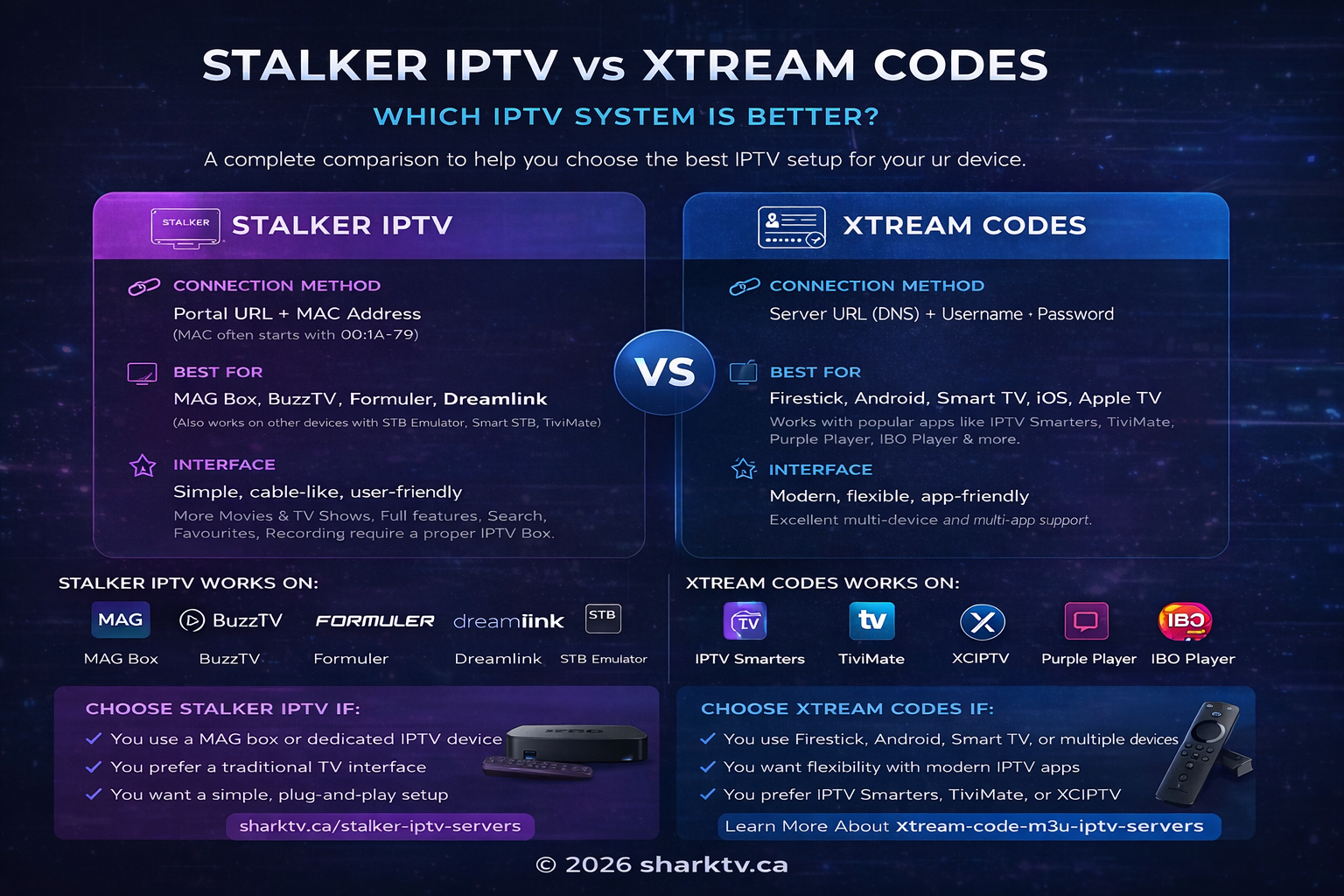
If you are shopping for the best Canadian IPTV subscription, the most critical decision comes down to your connection protocol: Stalker IPTV vs Xtream Codes. Stalker IPTV uses a dedicated server portal URL paired with hardware MAC-address authentication, while Xtream Codes-compatible IPTV relies on a server URL, username, and password.
Both systems are widely used across Canada, but they deliver very different streaming experiences. Stalker Portals are engineered for dedicated television set-top boxes like Formuler (MyTVOnline), Infomir MAG boxes, and BuzzTV receivers. Xtream Codes, by contrast, powers modern streaming player applications on the Amazon Fire TV Stick, Google TV, Android TV, and Smart TVs.
So, is Stalker IPTV better than Xtream Codes? Which setup is faster and easier to install? Can Stalker work on a Firestick or Smart TV? And which protocol gives you buffer-free live sports and 4K entertainment across Canadian internet providers like Bell, Rogers, and Telus?
This technical guide breaks down the core differences, speed advantages, hardware compatibility, and pricing to help you choose the right connection method for your household.
What Is the Difference Between Stalker IPTV and Xtream Codes?
The primary difference between Stalker IPTV and Xtream Codes lies in how your device authenticates and communicates with the streaming server:
- Stalker IPTV: Connects via a server portal URL bound strictly to your receiver's unique 12-digit hardware MAC address (e.g.,
00:1A:79:XX:XX:XX). There is no username or password to type. - Xtream Codes IPTV: Connects via an API using a server URL, username, and password entered into a third-party IPTV application.
These protocols govern authentication, channel switching speeds, and EPG delivery. They do not dictate which live channels or sports events you can watch—available channels and video resolutions depend on your chosen IPTV server tier and provider.
Stalker IPTV vs Xtream Codes Comparison Table
Here is an honest, concrete comparison of how Stalker and Xtream Codes perform on Canadian streaming setups:
| Feature | Stalker Portal IPTV | Xtream Codes IPTV |
|---|---|---|
| Login Credentials | Portal URL + Hardware MAC Address | Server URL + Username + Password |
| Best Hardware | Formuler (MyTVOnline 2/3), MAG boxes, BuzzTV | Amazon Firestick, Android TV, Google TV, Apple TV |
| Channel Zapping Speed | Near-instant (< 1 second hardware switching) | Fast (1–2 seconds, cached in application) |
| Multi-Device Viewing | 1 dedicated hardware box per subscription | Multi-room options available (1 to 5 devices) |
| TV Guide (EPG) | Native hardware EPG with instant timeline sync | Automated API fetch via player app |
| PVR & Live Recording | Native USB recording & scheduled series timers | Supported in apps like TiviMate Premium |
| Typical Canadian Price | From $15 to $20 CAD / month | From $15 CAD / month |
| 4K & HD Video Support | Full support for 4K 60FPS sports feeds | Full support for 4K & FHD streams |
For most Canadian viewers, your ideal choice depends entirely on the equipment you own and whether you want a traditional cable box experience or multi-room app flexibility.
What Is Stalker IPTV?
Stalker IPTV refers to an operator-grade Internet Protocol television middleware platform originally designed by Infomir. It functions like a commercial digital cable or satellite headend, where the server treats your connected receiver as a managed terminal.
Instead of manually logging in, the server identifies your device using its physical or virtual MAC address (often starting with the MAG prefix 00:1A:79). In your box settings, you input the provider's portal URL (e.g., http://portal.server.com/c/). Once registered, the box boots directly into full-screen television with zero manual playlist downloads.
Stalker Portal systems deliver:
- A familiar, traditional cable TV interface with channel numbers
- Instant channel switching without buffer pauses
- Integrated Electronic Program Guide (EPG) populated on boot
- Built-in Catch-Up TV and cloud playback where supported
- Hardware PVR recording to USB drives
Which IPTV Boxes Support Stalker Portal?
Stalker Portal connections require hardware or applications capable of portal emulation:
- Formuler Media Streamers: Formuler Z10, Z11 Pro, and Z Mini running the native MyTVOnline 2/3 platform.
- Infomir MAG Receivers: MAG 322, 424, 524, and 544 Linux/Android units.
- BuzzTV Set-Top Boxes: BuzzTV X5, HD5, and Classic models.
- STBEmu Application: An emulator app for Android TV and Firestick that mimics a MAG receiver.
A purpose-built receiver provides a superior living room experience thanks to its dedicated remote with number pads, guide shortcuts, and physical PVR buttons. If you are comparing hardware options, explore SharkTV's selection of IPTV boxes and Android streaming devices.
When configuring a Stalker Portal on your receiver, ensure your subscription is activated through a verified Canadian server provider with low-latency routing to prevent stream buffering during peak live broadcasts.
What Is Xtream Codes IPTV?
Xtream Codes IPTV is the modern API standard used across the IPTV streaming industry. Rather than locking an account to a single MAC address, Xtream Codes uses standard web API authentication consisting of:
- Server URL (or DNS address) with port
- Unique account username
- Account password
When entered into compatible IPTV players, the app makes encrypted server requests to fetch live channel bouquets, VOD movie posters, and EPG schedules on demand.
Xtream Codes is natively supported by top streaming players including:
- TiviMate IPTV Player (widely considered the best player for Android & Firestick)
- IPTV Smarters Pro & XCIPTV
- IBO Player, Nanomid, and SmartOne for Smart TVs
- GSE Smart IPTV for Apple iOS and Apple TV
Xtream Codes offers tremendous flexibility: you can install your favorite player on any device in your home without requesting device transfers from your provider.
Is Stalker IPTV Better Than Xtream Codes?
Neither connection format is universally "better"—they excel in completely different environments:
Choose Stalker IPTV If:
- You own a Formuler, MAG, or BuzzTV set-top box.
- You want your television to operate like classic digital cable.
- You want the fastest possible channel zapping with zero delay.
- The subscription is dedicated to one main living room television.
- You want easy PVR recording and live-pause functionality on external storage.
Choose Xtream Codes IPTV If:
- You stream primarily through an Amazon Fire TV Stick, Google TV, or Smart TV.
- You want to use modern player apps like TiviMate or Smarters Pro.
- You need a multi-connection package to watch on multiple TVs simultaneously.
- You want high-resolution movie and TV series posters, trailers, and subtitles.
- You want an easy login that works across portable devices when traveling.
Is Stalker IPTV Faster Than Xtream Codes?
In raw channel switching speed (zapping time), a Stalker Portal running on dedicated Formuler or MAG hardware is noticeably faster, often switching feeds in under 0.8 seconds.
However, when it comes to video streaming throughput and picture quality, both protocols stream identical video bitrates. Live video performance depends on:
- The stability and peering of the IPTV server cluster
- Your Canadian internet connection (Bell Fibe, Rogers Ignite, Telus PureFibre)
- Wi-Fi stability (5 GHz Wi-Fi or hardwired Ethernet is strongly recommended)
- Hardware decoding capabilities on your streaming stick or box
- ISP network management during peak sports hours
If you experience buffering during live broadcasts, changing from Stalker to Xtream Codes will not fix a weak Wi-Fi signal or congested ISP route.
Does Stalker IPTV Have More Movies and TV Shows?
No. Content libraries are determined by your provider's server bouquets, not the connection protocol. Both Stalker and Xtream Codes servers can carry over 25,000 live channels and 50,000+ on-demand movies and TV series.
However, Xtream Codes displays on-demand content with a richer, Netflix-style interface—including high-resolution cover posters, cast descriptions, and subtitle selectors.
Can Stalker IPTV Work on Amazon Firestick?
Yes. You can run Stalker Portals on an Amazon Fire TV Stick using emulation applications like STBEmu (Set-Top Box Emulator) or by configuring a portal account inside TiviMate.
However, running an emulator app adds a layer of software processing. For Firestick hardware, an Xtream Codes subscription paired with TiviMate almost always provides a smoother, more intuitive experience.
How to Install Stalker IPTV on Firestick
If you have a Stalker subscription and want to run it on a Firestick, here is the standard setup process using an emulator or player app:
- Install your chosen player (such as TiviMate or STBEmu) from the Amazon Appstore or via Downloader.
- Open the app and navigate to Settings > Playlists > Add Playlist.
- Select Stalker Portal as your connection type.
- Enter the Portal URL provided by your IPTV service (e.g.,
http://mag.domain.com/c/). - Locate your app's virtual MAC address and provide it to your provider for activation.
- Once authorized, save the profile and restart the app to load live channels.
Can Stalker IPTV Work on a Smart TV?
Yes, provided your Smart TV's app store (Samsung Tizen, LG webOS, or Google TV) supports portal applications like Smart STB, IBO Player, or Nanomid.
Keep in mind that built-in TV operating systems have limited RAM and slower processing chips. Connecting an external streaming device—such as a Fire TV Stick 4K Max or Formuler box—delivers vastly superior performance and guide responsiveness.
Does TiviMate Support Stalker IPTV and Xtream Codes?
Yes! TiviMate is one of the few premium Android TV applications that natively supports Xtream Codes, Stalker Portals, and M3U playlists inside a single unified interface.
For Xtream Codes, simply enter your Server URL, Username, and Password. For Stalker, enter the Portal URL and match your registered MAC address. To master TiviMate configuration, read our detailed TiviMate IPTV Player setup guide.
Can You Use Stalker IPTV on Multiple Devices?
Generally, no. Stalker subscriptions are locked to one registered MAC address. If you want to stream on a second television simultaneously, you need a separate subscription line.
If you require multi-room streaming, choose an Xtream Codes IPTV server with multi-connection plan options (supporting 2 to 5 concurrent streams).
Which IPTV System Is Easier to Set Up?
For most users, Xtream Codes is easier because setup only requires typing three lines of text into an app. You never have to worry about MAC address formatting, STB profile settings, or device registration mismatches.
However, if you purchase a pre-configured Formuler or MAG box directly from your provider, Stalker setup is virtually plug-and-play.
Choosing Between Stalker IPTV and Xtream Codes in Canada
When selecting the best IPTV in Canada, match your connection method to your hardware and household viewing habits:
- For Formuler, MAG, and BuzzTV owners: Choose a dedicated Stalker Portal for unbeatable zapping speed and native PVR recording.
- For Firestick, Android TV, and multi-TV households: Choose Xtream Codes for seamless app flexibility, automated EPG syncing, and multi-connection streaming.
As a leading Canadian provider, SharkTV supplies both architectures with instant activation, high-bandwidth Canadian servers, and local support. You can compare available IPTV subscription packages, browse our premium Stalker IPTV packages, or explore our flexible Xtream Codes IPTV options.
Frequently Asked Questions: Stalker IPTV vs Xtream Codes
1. What is the main difference between Stalker IPTV and Xtream Codes?
Stalker uses a portal URL authenticated by your device's MAC address, making it ideal for dedicated set-top boxes. Xtream Codes uses a server URL, username, and password, making it versatile for streaming apps on Firestick and Android TV.
2. Is Stalker IPTV better than Xtream Codes?
Neither is inherently better. Stalker offers faster channel switching and a classic cable feel on Formuler/MAG hardware. Xtream Codes is superior for multi-room viewing and modern app interfaces.
3. Is Stalker IPTV faster?
Yes, in channel switching (zapping time), Stalker is faster on dedicated hardware. However, actual stream quality and buffer-free playback depend on your internet speed and the provider's server capacity.
4. Does Stalker IPTV require a MAC address?
Yes. Stalker portals authenticate your account through your device's 12-digit physical or virtual MAC address (formatted as 00:1A:79:XX:XX:XX).
5. Does Xtream Codes require a MAC address?
No. Xtream Codes uses standard API credentials (server URL, username, and password) and can be used on any supported player without hardware registration.
6. Can I use Stalker IPTV on Firestick?
Yes, using emulation apps like STBEmu or TiviMate's Stalker profile. However, Xtream Codes is much smoother and more intuitive on Fire TV devices.
7. Can Stalker IPTV work on Samsung or LG Smart TVs?
Yes, if your Smart TV supports apps like Smart STB or IBO Player. For better performance, an external Firestick 4K Max or Formuler box is recommended.
8. Does TiviMate support Stalker Portal?
Yes. TiviMate natively supports Stalker Portals alongside Xtream Codes and M3U playlists.
9. Can IPTV Smarters use Stalker Portal?
Most standard IPTV Smarters versions only support Xtream Codes and M3U playlists. To use a Stalker portal, use TiviMate, STBEmu, or a dedicated receiver.
10. Which system is better for an IPTV box?
If you own a Formuler, MAG, or BuzzTV receiver, Stalker Portal provides the best native cable experience with full remote control number-pad support.
11. Can Stalker IPTV support 4K?
Yes. Both Stalker and Xtream Codes fully support 4K UHD 60FPS video feeds when your provider, hardware, and television support 4K resolution.
12. Does Xtream Codes support 4K?
Yes. Xtream Codes streams 4K sports and VOD movies seamlessly across supported 4K hardware like the Fire TV Stick 4K and NVIDIA Shield.
13. Which IPTV system has more movies?
VOD libraries depend entirely on the provider's server, not the connection protocol. However, Xtream Codes presents movies with richer poster art and episode guides.
14. Can I use one IPTV subscription on multiple televisions?
With Stalker, no—it is locked to one hardware MAC address. With Xtream Codes, yes—if you select an eligible multi-connection subscription plan.
15. Can I switch from Stalker IPTV to Xtream Codes?
Yes, if your provider supports both connection formats. You can contact support to change your subscription line to Xtream Codes credentials.
16. Is Stalker IPTV legal in Canada?
Stalker Portal and Xtream Codes are legitimate networking protocols. Legal compliance depends on whether the streaming service holds appropriate broadcast rights for the programming delivered.
Final Thoughts: Stalker IPTV or Xtream Codes?
When choosing between Stalker IPTV and Xtream Codes in Canada, let your streaming equipment guide your decision:
- Choose Stalker IPTV if you want instant channel zapping, hardware PVR recording, and a traditional cable box interface on Formuler or MAG receivers.
- Choose Xtream Codes IPTV if you stream on an Amazon Firestick or Smart TV, want modern app interfaces like TiviMate, or need multi-room viewing for your family.
For reliable, buffer-free performance across Canada, browse SharkTV's Canadian IPTV subscriptions to find the perfect server and connection method for your home.
Related Products