If you've been researching modern ways to watch television, you've probably come across the term IPTV. But what exactly is IPTV, how does it work, and how is it different from traditional cable, satellite, and other forms of streaming?
IPTV has become a common way to deliver live television and on-demand content through an internet connection. Instead of receiving television programming through a cable line or satellite dish, IPTV uses internet technology to deliver streams to compatible televisions, streaming boxes, computers, smartphones, and other devices.
This beginner's guide explains what IPTV means, how the technology works, the different ways an IPTV service can connect to your device, what equipment you may need, and what to consider before choosing a service.
If you're exploring different streaming options, visit SharkTV.ca to learn more about compatible devices and IPTV solutions available across Canada.
What Is IPTV?
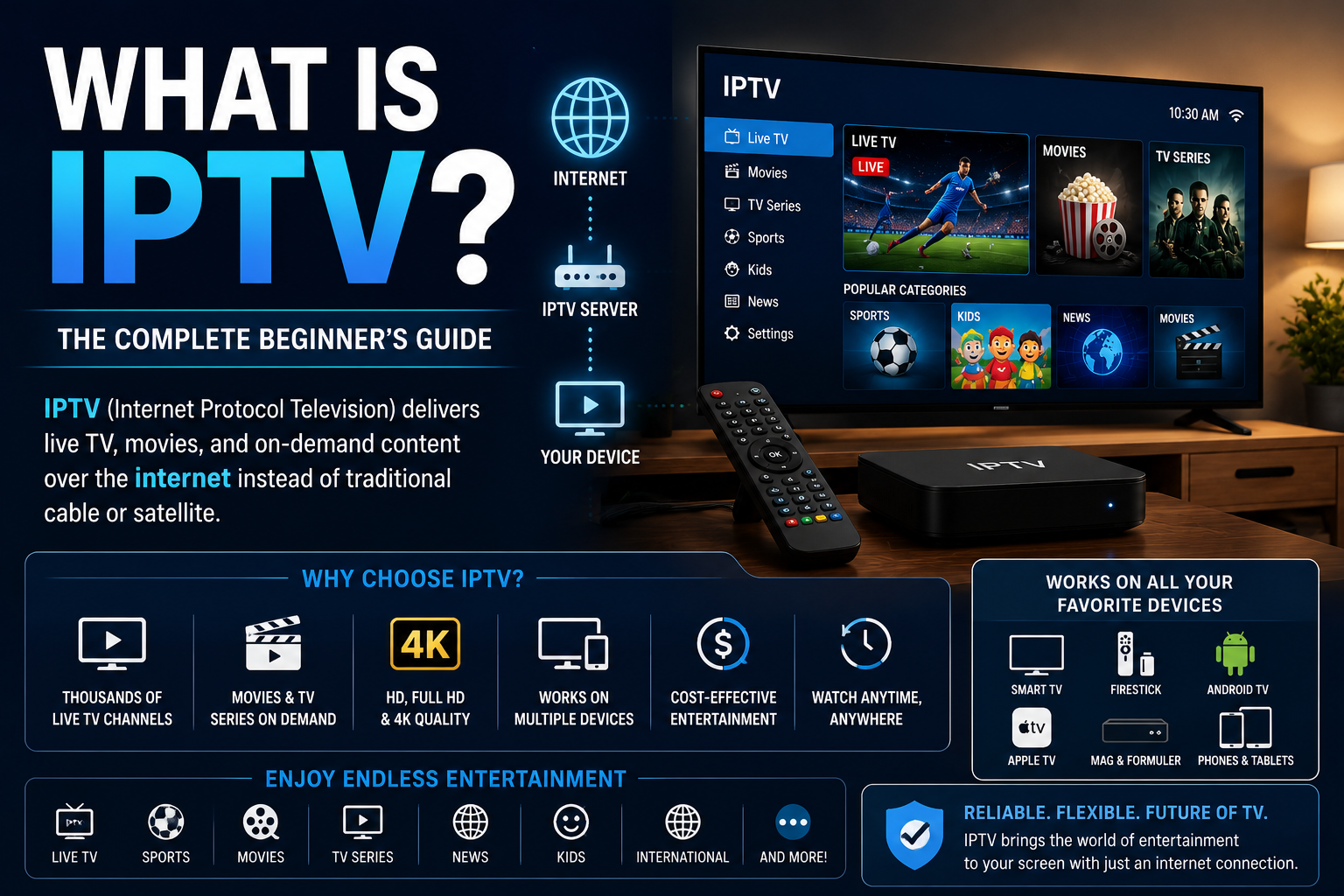
IPTV stands for Internet Protocol Television. It is a method of delivering television programming and video content using Internet Protocol (IP) networks.
In simple terms, IPTV allows television content to be delivered through an internet connection rather than through a traditional cable television line, antenna, or satellite dish.
Depending on the service, IPTV can provide live television as well as movies, TV series, and other on-demand programming. The available content and features depend on the particular IPTV service and subscription.
How Does IPTV Work?
When you select something to watch through IPTV, your compatible application or streaming device connects to an IPTV server through the internet. The server delivers the selected stream to your device, where it is decoded and displayed on your television or screen.
This is different from traditional television systems that continuously deliver a collection of channels through cable or satellite infrastructure. IPTV uses internet networking to request and deliver content to compatible devices.
After activating an IPTV subscription, the customer normally receives connection information that is entered into a supported application or device. Depending on the service, the connection may use an M3U playlist, Xtream Codes login, or Portal and MAC Address authentication.
To better understand one of the most common connection formats, read our M3U IPTV guide.
IPTV Service vs IPTV Player: What's the Difference?
One common source of confusion for beginners is the difference between an IPTV service and an IPTV player.
The IPTV service provides access to the streams and content included with a subscription. The IPTV player or application is the software used to connect to that service and display the content on your device.
Installing an IPTV player by itself does not normally provide a television subscription. The application generally requires compatible login information, a playlist, or portal information from an IPTV service.
What Can You Watch With IPTV?
The content available through IPTV varies considerably between services. Depending on the subscription, IPTV may provide access to:
- Live television
- Movies
- TV series
- Sports programming
- News
- International programming
- Kids programming
- Music and documentaries
- Video-on-demand content
Some services focus mainly on live television, while others combine live TV with larger movie and television-series libraries.
Live TV, VOD and Catch-Up IPTV
IPTV can include several different types of viewing.
Live TV delivers television streams as they are being broadcast. Video on Demand (VOD) allows viewers to select available movies or television series and watch them when they choose.
Some IPTV services may also provide catch-up functionality on selected channels. This allows previously aired programming to be watched later when the feature is supported by the service.
Which Devices Support IPTV?
One reason IPTV is widely used is that it can work on many different types of internet-connected devices. The exact compatibility depends on the IPTV service, connection method, and application.
- Amazon Firestick and Fire TV
- Android TV and Google TV
- Android TV Boxes
- Samsung Smart TVs
- LG Smart TVs
- Apple TV
- BuzzTV boxes
- Formuler boxes
- Compatible MAG devices
- Windows computers
- Mac computers
- Android smartphones
- iPhones and iPads
- Tablets
If you're deciding which type of hardware is suitable for your setup, our IPTV Box vs Android Box guide explains the differences between two common IPTV device options.
Do You Need an IPTV Box?
Not necessarily. A dedicated IPTV box can provide a convenient television-style experience, but IPTV can also work through compatible applications installed directly on Smart TVs, Android devices, Firestick, Apple TV, computers, smartphones, and tablets.
The right setup depends on the connection method supported by the IPTV service and how you prefer to watch television.
What Are M3U, Xtream Codes and Stalker IPTV?
These terms describe different methods commonly used to connect IPTV services to compatible applications and devices.
M3U commonly uses a playlist URL that is entered into a compatible media player or IPTV application.
Xtream Codes typically uses a server address, username, and password. Many IPTV applications provide dedicated login fields for this type of connection.
Stalker or Portal-based IPTV commonly uses a portal URL together with MAC Address authentication and is often used with compatible IPTV boxes and portal-based applications.
The connection method does not determine the quality of an IPTV service by itself. Its main purpose is to determine how a compatible device or application connects to the service.
What Are the Benefits of IPTV?
The features available depend on the provider, but IPTV can offer several practical advantages for viewers.
- Compatibility with many types of streaming devices
- Live television and on-demand viewing from one service where available
- HD and Full HD streams, with higher resolutions where available
- Electronic Program Guide (EPG) support on compatible services
- Different IPTV applications and viewing interfaces
- Access through internet-connected devices
- International programming depending on the subscription
What Internet Speed Do You Need for IPTV?
There is no single internet speed that guarantees perfect IPTV performance because bandwidth requirements depend on the resolution and quality of the stream.
A higher-resolution stream generally requires more bandwidth than a lower-resolution stream. Other people and devices using the same internet connection can also affect the bandwidth available to your IPTV device.
Connection stability is just as important as advertised internet speed. A fast internet plan combined with weak Wi-Fi can still produce poor streaming performance.
Wi-Fi or Ethernet for IPTV?
Both Wi-Fi and Ethernet can be used for IPTV. A strong modern Wi-Fi connection may provide excellent performance, particularly when the streaming device is located close to the router.
Ethernet can provide a more consistent wired connection for Smart TVs and IPTV boxes that remain in one location. It can be particularly useful in homes where Wi-Fi interference or distance from the router causes an unstable connection.
Why Does IPTV Sometimes Buffer or Freeze?
Buffering does not automatically mean the IPTV service is the problem. Streaming performance can be affected by several parts of the setup.
- Weak or unstable Wi-Fi
- Internet congestion
- An overloaded home network
- An older or underpowered streaming device
- IPTV application problems
- Temporary server or stream issues
- Device software problems
Testing another channel, application, device, or internet connection can help determine which part of the setup is causing the problem.
Is IPTV the Same as Regular Streaming?
IPTV and other internet streaming services both use internet technology to deliver video, but the viewing experience can be different.
IPTV services commonly organize live television into channels and may include features such as an Electronic Program Guide, favourites, catch-up, and video-on-demand. Other streaming platforms may focus primarily on individual movies, series, or videos selected from a library.
How to Choose an IPTV Service
When comparing IPTV services, avoid making a decision based only on the advertised number of channels. A large channel list does not necessarily mean the service will be better for your particular needs.
Consider factors such as:
- Compatibility with your streaming device
- The connection method required by the service
- Availability of the programming you actually want
- Picture quality options
- Customer and technical support
- Setup assistance
- Subscription and renewal terms
- Overall ease of use
If you are looking for a premium Canadian IPTV provider with a variety of Stalker and Xtream Codes IPTV packages, consider SharkTV.ca.
Frequently Asked Questions About IPTV
What does IPTV stand for?
IPTV stands for Internet Protocol Television. It refers to television content delivered using Internet Protocol networks rather than traditional cable or satellite distribution.
Do I need a Smart TV to use IPTV?
No. IPTV can be used on many compatible devices, including streaming boxes, Firestick, computers, smartphones, tablets, and Smart TVs.
Is an IPTV player the same as an IPTV subscription?
No. An IPTV player is an application used to display and organize streams. An IPTV subscription provides the service and connection information used by a compatible player or device.
Can IPTV be used on more than one device?
That depends on the IPTV provider and subscription. A service may allow installation on different devices while limiting how many devices can stream simultaneously. Always check the connection rules for your subscription.
Can IPTV work on a Smart TV?
Yes. Many Samsung, LG, Android TV, and Google TV models can use compatible IPTV applications. App availability varies by television model, operating system, region, and app store.
Does IPTV require a satellite dish or cable connection?
IPTV itself is delivered through an internet connection, so a traditional satellite dish or cable television connection is not required for IPTV delivery.
Final Thoughts
IPTV, or Internet Protocol Television, is a technology for delivering television and video content through internet networks. Instead of being limited to traditional cable or satellite delivery, viewers can use compatible applications and devices to access the content provided by their IPTV service.
For beginners, the most important things to understand are the difference between the IPTV service and the IPTV player, which connection method your subscription uses, whether your device is compatible, and whether your home internet connection is stable enough for streaming.
Once those basics are understood, choosing an appropriate device, application, and IPTV service becomes much easier.
Related Products